
Client Credentials & Site Binding
Client Credentials is intended for server applications that access a known set of sites. The client first obtains an access token and then binds each approved site to its authorization scope.
1. Obtain Client Credentials
Pylontech OpenAPI does not currently provide self registration.
Contact Pylontech technical support and provide the partner name, intended use case, target region to get your client id and secret.
zhao.kai@pylontech.com.cnyuan.zhiyan@pylontech.com.cn
| Field | Required | Description |
|---|---|---|
| Company Name | Yes | Full legal name of the company applying for OpenAPI access. |
| Company Address | Optional | Registered address of the company. |
| Company Registration / Tax Identification Number | Optional | Official company or tax identifier in the company's jurisdiction, such as an EIN, VAT number, or ABN. |
| Contact Name | Yes | Name of the person responsible for the integration. |
| Phone Number | Optional | Contact phone number, including the country or region code. |
| Yes | Contact email used for registration updates and client information. |
2. Obtain an Access Token
Send an OAuth 2.0 Client Credentials request to the token endpoint for the site's region.
| Region | Token endpoint |
|---|---|
| Europe | https://openapi.pylontechcloud.com/api/auth/oauth2/token |
| Australia | https://openapi-au.pylontechcloud.com/api/auth/oauth2/token |
Post form fields
| Field | Required | Description |
|---|---|---|
grant_type | Yes | Must be client_credentials. |
client_id | Yes | Client identifier issued by Pylontech. |
client_secret | Yes | Client secret issued by Pylontech. |
Example request:
bash
curl --request POST \
  'https://openapi.pylontechcloud.com/api/auth/oauth2/token' \
  --header 'Content-Type: application/x-www-form-urlencoded' \
  --data-urlencode 'grant_type=client_credentials' \
  --data-urlencode 'client_id=YOUR_CLIENT_ID' \
  --data-urlencode 'client_secret=YOUR_CLIENT_SECRET'
Example response:
json
{
  "access_token": "eyJ...",
  "token_type": "Bearer",
  "expires_in": 86400
}
3. Find the Site ID
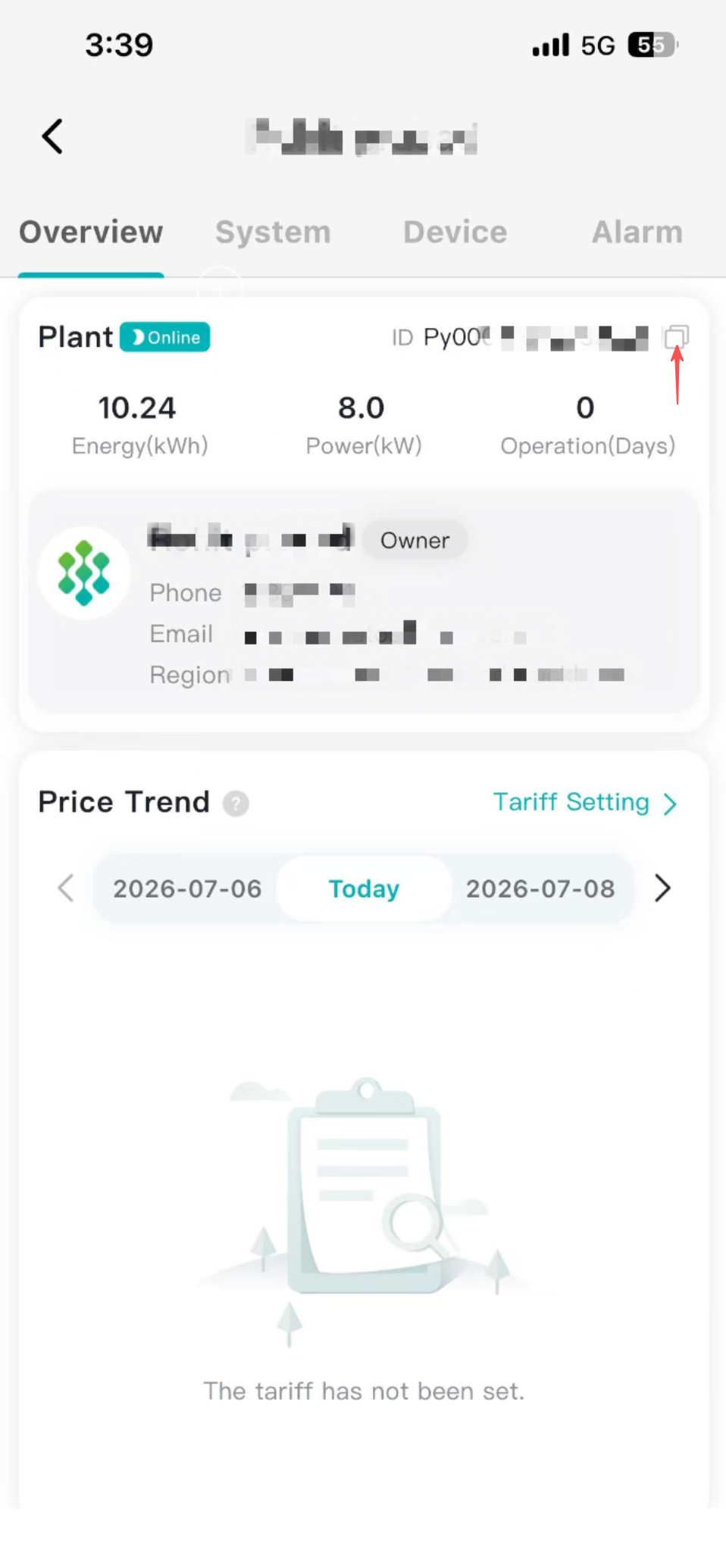
Open Plant Management in Pylontech APP and copy the value displayed in the Plant ID column.
4. Bind the Site
Before the client can access site data, bind the site to the client authorization.
Request definition:
http
POST {OPENAPI_BASE_URL}/sites
Authorization: Bearer {ACCESS_TOKEN}
Content-Type: application/json

{
  "siteId": "your-site-id"
}
Example request:
bash
curl --request POST \
  '{OPENAPI_BASE_URL}/sites' \
  --header 'Authorization: Bearer {ACCESS_TOKEN}' \
  --header 'Content-Type: application/json' \
  --data '{
    "siteId": "your-site-id"
  }'
Repeat the binding operation for each site for the client.
5. Unbind the Site
Unbind a site when the client should no longer be authorized to access it.
Request definition:
http
DELETE {OPENAPI_BASE_URL}/sites
Authorization: Bearer {ACCESS_TOKEN}
Content-Type: application/json

{
  "siteId": "your-site-id"
}
Example request:
bash
curl --request DELETE \
  '{OPENAPI_BASE_URL}/sites' \
  --header 'Authorization: Bearer {ACCESS_TOKEN}' \
  --header 'Content-Type: application/json' \
  --data '{
    "siteId": "your-site-id"
  }'
After the site is unbound, it is no longer returned in the authorized site list and the client can no longer access its devices or data.
6. Verify Access
Query the authorized site list:
bash
curl '{OPENAPI_BASE_URL}/sites' \
  --header 'Authorization: Bearer {ACCESS_TOKEN}'
The response should contain the bound site. A successfully issued token does not by itself grant access to every site; resource access is determined by the client's current site bindings.
See Get site list for the definition.