
Authorization Code
Authorization Code is used when a site owner grants a partner application access to the owner's Pylontech resources.
The site owner completes authentication and authorization in Pylontech Auth. The partner backend receives an authorization code through its registered callback, exchanges the code for tokens, and then calls Pylontech OpenAPI on behalf of the owner.
Auth Service URLs
Use the authentication service in the same region as the site.
| Environment | AUTH_BASE_URL |
|---|---|
| Europe | https://openapi.pylontechcloud.com/api/auth |
| Australia | https://openapi-au.pylontechcloud.com/api/auth |
The endpoints used by this flow are:
| Operation | Endpoint |
|---|---|
| Request authorization | GET {AUTH_BASE_URL}/oauth2/authorize |
| Exchange or refresh a token | POST {AUTH_BASE_URL}/oauth2/token |
| Revoke a token | POST {AUTH_BASE_URL}/oauth2/revoke |
Authorization Flow
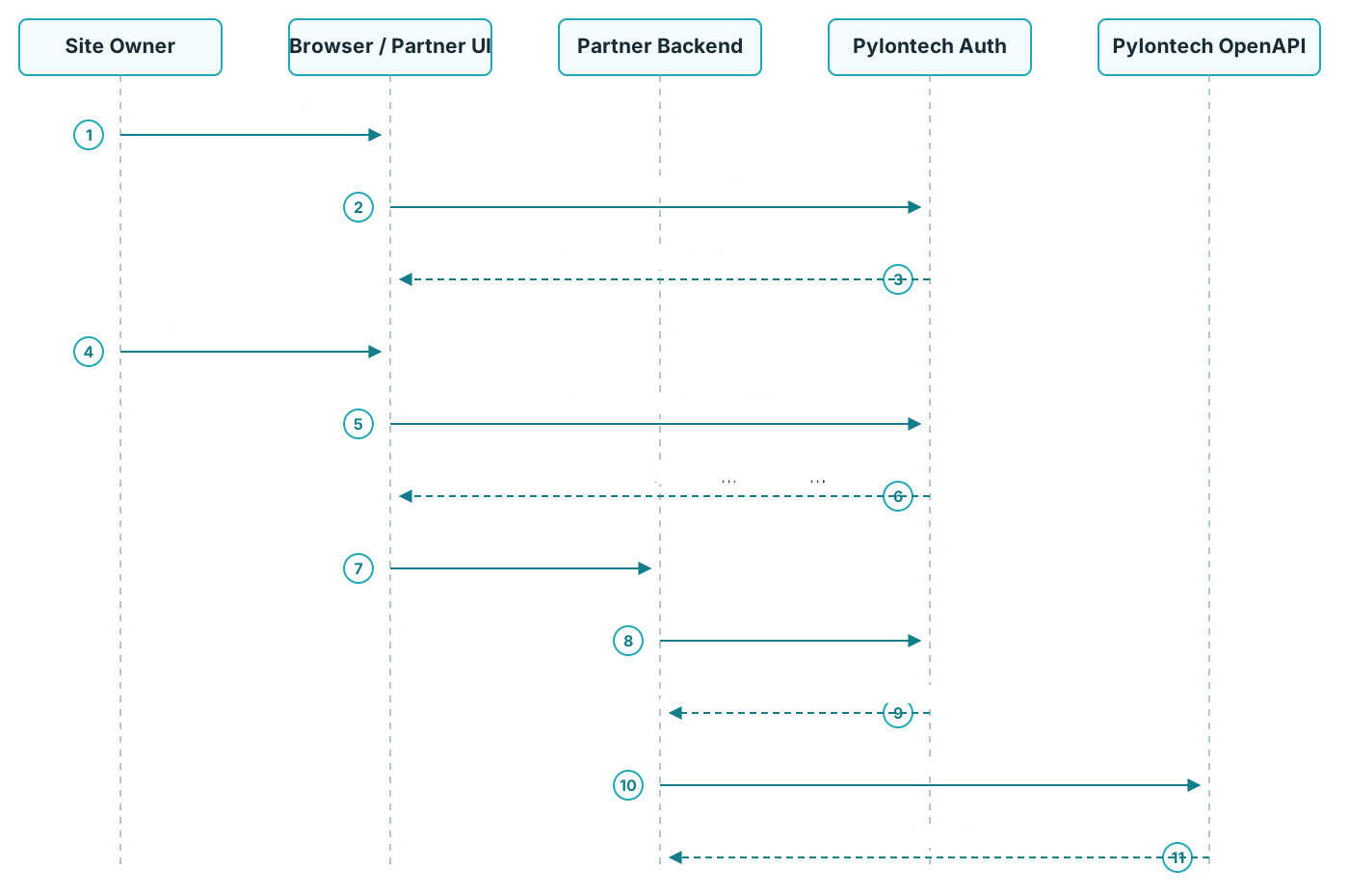
1. Register the Application
OAuth 2.0 client registration is handled by Pylontech. To request a client, complete the application information below and send it by email to
zhao.kai@pylontech.com.cnyuan.zhiyan@pylontech.com.cn
Application information
| Field | Required | Description |
|---|---|---|
| Company Name | Yes | Full legal name of the company applying for OpenAPI access. |
| Company Address | Optional | Registered address of the company. |
| Company Registration / Tax Identification Number | Optional | Official company or tax identifier in the company's jurisdiction, such as an EIN, VAT number, or ABN. |
| Contact Name | Yes | Name of the person responsible for the integration. |
| Phone Number | Optional | Contact phone number, including the country or region code. |
| Yes | Contact email used for registration updates and client information. | |
| Application Name | Yes | Name of the application presented to the site owner during authorization. |
| Redirect URI | Yes | Callback URI to which Pylontech Auth redirects the browser after authorization. |
Pylontech reviews the application and creates an OAuth 2.0 client. After the application is approved, Pylontech returns:
| Parameter | Description |
|---|---|
client_id | Identifier assigned to the partner application. |
client_secret | Secret assigned to the partner application. |
scope | Authorized scope. The assigned value is api:all. |
The redirect_uri in the authorization request and token request must exactly match the URI registered for the client.
2. Request an Authorization Code
Redirect the site owner's browser to the authorization endpoint.
http
GET {AUTH_BASE_URL}/oauth2/authorizeQuery parameters
| Parameter | Required | Description |
|---|---|---|
response_type | Yes | Must be code. |
client_id | Yes | Client identifier issued by Pylontech. |
redirect_uri | Yes | Registered callback URI for the partner application. |
scope | Yes | Scope requested by the application, for example api:all. |
state | Yes | Value generated by the partner application and returned unchanged with the callback. |
Example authorization URL:
text
https://openapi.pylontechcloud.com/api/auth/oauth2/authorize?response_type=code&client_id=YOUR_CLIENT_ID&redirect_uri=https%3A%2F%2Fpartner.example.com%2Foauth%2Fcallback&scope=api%3Aall&state=YOUR_STATEPylontech Auth presents its login and authorization page. After the owner approves access, the browser is redirected to the registered callback:
text
https://partner.example.com/oauth/callback?code=AUTHORIZATION_CODE&state=YOUR_STATEVerify that the returned state matches the value associated with the authorization request before exchanging the code.
3. Exchange the Code for Tokens
The partner backend exchanges the authorization code at the token endpoint.
http
POST {AUTH_BASE_URL}/oauth2/token
Content-Type: application/x-www-form-urlencoded
Form fields
| Field | Required | Description |
|---|---|---|
grant_type | Yes | Must be authorization_code. |
code | Yes | Authorization code returned to the callback URI. |
redirect_uri | Yes | The same registered URI used in the authorization request. |
client_id | Yes | Client identifier issued by Pylontech. |
client_secret | Yes | Client secret issued by Pylontech. |
Example request:
bash
curl --request POST \
  '{AUTH_BASE_URL}/oauth2/token' \
  --header 'Content-Type: application/x-www-form-urlencoded' \
  --data-urlencode 'grant_type=authorization_code' \
  --data-urlencode 'code={AUTHORIZATION_CODE}' \
  --data-urlencode 'redirect_uri=https://partner.example.com/oauth/callback' \
  --data-urlencode 'client_id={CLIENT_ID}' \
  --data-urlencode 'client_secret={CLIENT_SECRET}'
Example response:
json
{
  "access_token": "eyJ...",
  "refresh_token": "lDL...",
  "scope": "all",
  "token_type": "Bearer",
  "expires_in": 3599
}
Use the value returned in expires_in as the access token validity period.
4. Call OpenAPI
Send the access token in the HTTP Authorization header:
http
Authorization: Bearer {ACCESS_TOKEN}Example:
bash
curl '{OPENAPI_BASE_URL}/sites' \
  --header 'Authorization: Bearer {ACCESS_TOKEN}'
The response contains only sites covered by the owner's current authorization.
5. Refresh the Access Token
Use the refresh token to obtain a new access token without asking the owner to authorize again.
http
POST {AUTH_BASE_URL}/oauth2/token
Content-Type: multipart/form-data
Form fields
| Field | Required | Description |
|---|---|---|
grant_type | Yes | Must be refresh_token. |
refresh_token | Yes | Refresh token returned by the token endpoint. |
client_id | Yes | Client identifier issued by Pylontech. |
client_secret | Yes | Client secret issued by Pylontech. |
Example request:
bash
curl --request POST \
  '{AUTH_BASE_URL}/oauth2/token' \
  --form 'grant_type=refresh_token' \
  --form 'refresh_token={REFRESH_TOKEN}' \
  --form 'client_id={CLIENT_ID}' \
  --form 'client_secret={CLIENT_SECRET}'
Example response:
json
{
  "access_token": "eyJ...",
  "refresh_token": "lDL...",
  "scope": "write read",
  "token_type": "Bearer",
  "expires_in": 3600
}
Use the tokens returned by the refresh response for subsequent requests.
6. Revoke a Token
Revoke a token when the owner disconnects the partner application or the integration should no longer use the authorization.
http
POST {AUTH_BASE_URL}/oauth2/revoke
Content-Type: multipart/form-data
Form fields
| Field | Required | Description |
|---|---|---|
token_type_hint | Yes | Type of token being revoked, for example access_token. |
token | Yes | Token to revoke. |
client_id | Yes | Client identifier issued by Pylontech. |
client_secret | Yes | Client secret issued by Pylontech. |
Example request:
bash
curl --request POST \
  '{AUTH_BASE_URL}/oauth2/revoke' \
  --form 'token_type_hint=access_token' \
  --form 'token={ACCESS_TOKEN}' \
  --form 'client_id={CLIENT_ID}' \
  --form 'client_secret={CLIENT_SECRET}'
After revocation, the token must no longer be used to call OpenAPI. Revoke the refresh token as well when the complete authorization is being disconnected.